




Portable fans have changed a lot.
Not that long ago, buying one usually meant choosing between a few little plastic handheld fans that gave you a light breeze, made a surprising amount of noise and hopefully lasted until the end of the day.
Now the category is completely different.
There are pocket-sized turbo fans, wearable waist fans, neck fans, magnetic phone fans, portable fans that double as power banks and even handheld fans with electronically cooled metal plates that become icy cold against your skin.
That is great if you want more ways to stay cool.
It also makes choosing the right fan much harder.
One fan might advertise 20,000 RPM. Another has a huge battery. Another weighs half as much. Another has 100 speed settings. Another clips to your waist. Another costs $15 while something that looks surprisingly similar costs $80.
So, what actually matters?
At CapyCool, we spend a slightly unreasonable amount of time thinking about portable cooling. We sell everything from tiny everyday-carry fans to long-runtime wearable models, and one of the biggest things we have learned is this:
There is no single "best portable fan". There is a best fan for how you plan to use it.
The trick is understanding what the specifications really mean, which ones matter to you and what is hiding inside the fan that you cannot see in a product photo.
This guide breaks it all down.
If you would rather skip straight to the fans, you can browse the complete CapyCool portable fan collection here.
Quick Start: What's in This Guide?
- What to look for in a portable fan
- Which type of portable fan should you choose?
- How powerful should a portable fan be?
- Battery life, mAh and Wh explained
- How much does fan noise matter?
- Weight and portability
- Hands-free and wearable cooling
- What is actually inside a portable fan?
- Cheap vs better-built portable fans
- How ice compress and cooling plate fans work
- Which portable fan should you choose?
- Portable fan FAQ
Key Takeaways
- Do not choose a portable fan based on one big number. RPM, battery capacity and speed settings only tell part of the story.
- Start with how you will use the fan. A pocket fan, waist fan and large handheld turbo fan solve very different problems.
- More airflow usually means more power consumption and noise. Adjustable speeds let you balance cooling, runtime and sound.
- Battery capacity matters, but bigger is not always better. Larger batteries generally mean more runtime, but also more size and weight.
- The quality differences are often hidden inside. Motors, bearings, lithium cells, PCB protection, wiring and construction all matter.
- Brushless motors can offer advantages in efficiency, noise and longevity, but "brushless" alone does not guarantee a high-quality fan.
- Cooling plates and "ice compress" fans do not turn a handheld fan into an air conditioner. They provide direct cold contact against your skin alongside normal fan airflow.
- The best portable fan is the one you will actually use. Power is pointless if the fan is too large, heavy or inconvenient for your day.
What Should You Look for When Buying a Portable Fan?
If you only remember one part of this guide, make it this.
A good portable fan should balance seven things:
- Airflow: Can you actually feel it where and how you plan to use it?
- Battery: Will it last long enough for your day?
- Noise: Is the airflow usable in your environment?
- Weight: Will you actually carry or wear it?
- Form: Handheld, waist, neck, clip-on, desk or something else?
- Flexibility: Can it perform more than one useful role?
- Build quality: What motor, battery, circuitry and materials are actually inside it?
The mistake is choosing a fan based on one specification alone.
A massive battery sounds great until the fan becomes too heavy for your pocket.
An ultra-light pocket fan sounds perfect until you expect it to run continuously through a long outdoor workday.
Maximum power is useful outside, but you probably do not need that same setting blowing next to your face during a quiet meeting.
The right portable fan is therefore a balancing act.
1. Start With How You Actually Want to Use Your Fan
Before comparing RPM, battery capacity or motor types, ask a much simpler question:
Where will I use this fan?
A commuter, tradie, traveller and someone looking for a bedside fan are all buying "portable fans", but they need very different products.
Handheld Portable Fans
The classic handheld fan is still one of the most versatile options.
You can point the airflow exactly where you want it, move it between your face, neck and body, then throw it into a bag when you are finished.
They are particularly useful for:
- Commuting
- Walking
- Travelling
- Theme parks
- Festivals
- Outdoor queues
- Sporting events
- Shopping
- School pickup
- Stuffy indoor spaces
- Keeping in a handbag or backpack
The big consideration is size.
A true pocket fan should be small and light enough that taking it with you does not become a decision.
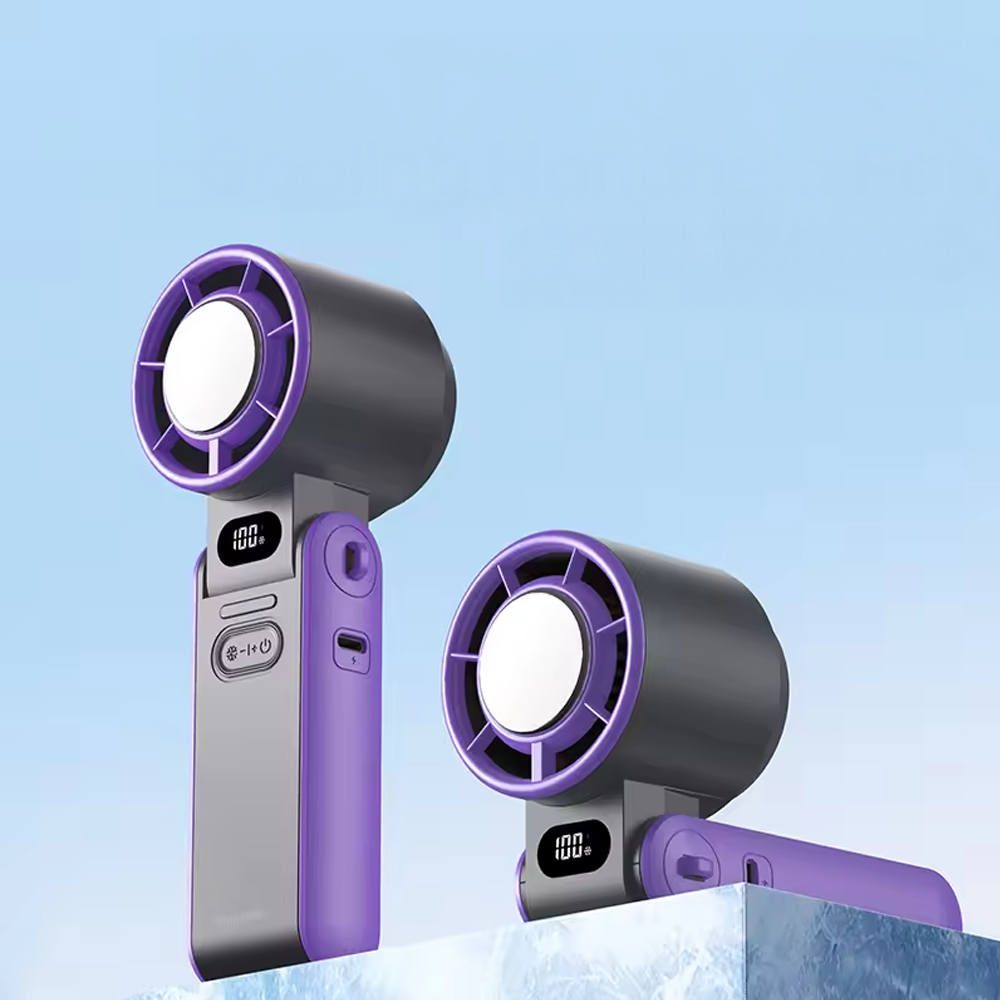
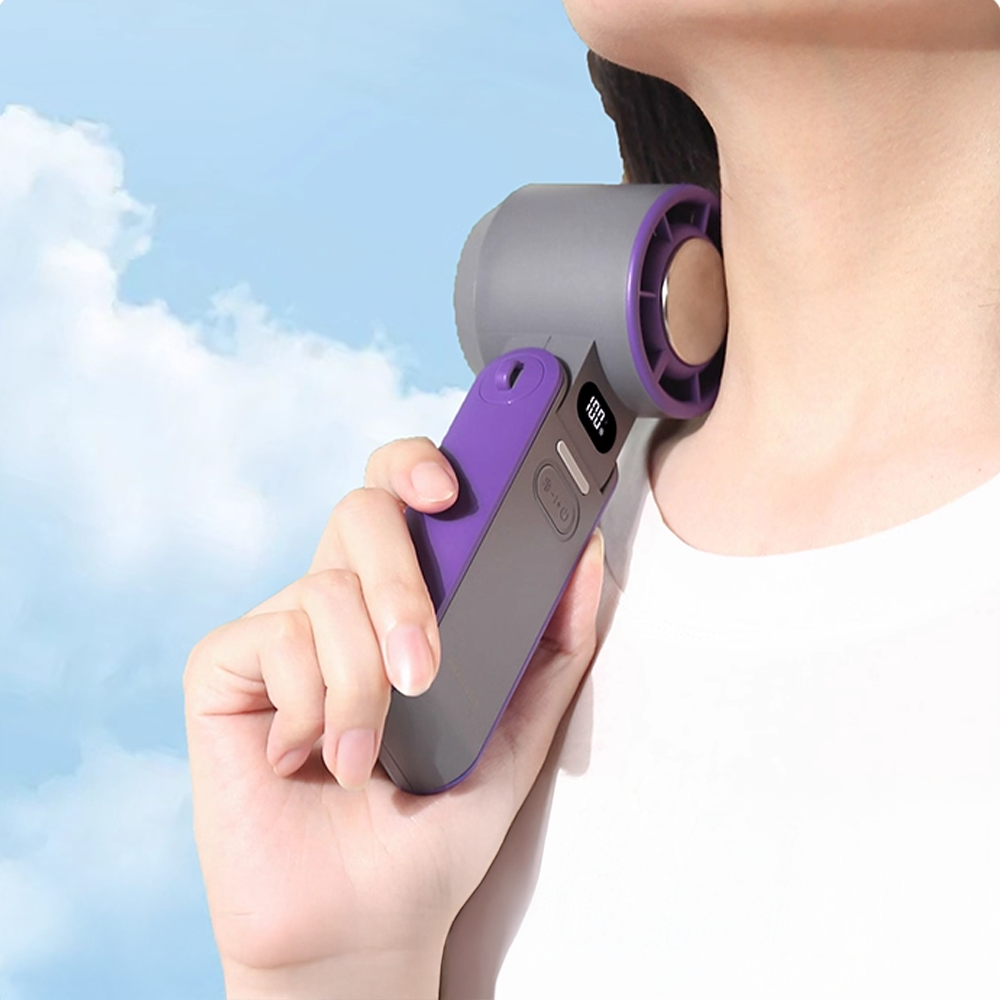
The CapyMini Turbo Fan with Ice Compress, for example, weighs around 90g and measures approximately 42mm wide by 110mm tall. It still packs a 3000mAh rechargeable battery, focused airflow, a cold-touch cooling plate, foldable desk mode and lanyard mode into that small footprint.
That is a very different proposition from a heavier fan built around maximum battery life.
Neither approach is inherently better.
It depends whether you want something you barely notice in your bag or something designed to keep running for much longer.
Larger Handheld and Turbo Fans
Move up in size and you can generally make room for larger motors, bigger batteries, stronger structural components and additional features.
That is where newer "turbo fan" designs sit.
The trade-off is obvious: more hardware means more weight.
For someone travelling with only a small handbag, that might be undesirable.
For someone who wants one fan beside them through an entire day, it might be exactly what they want.
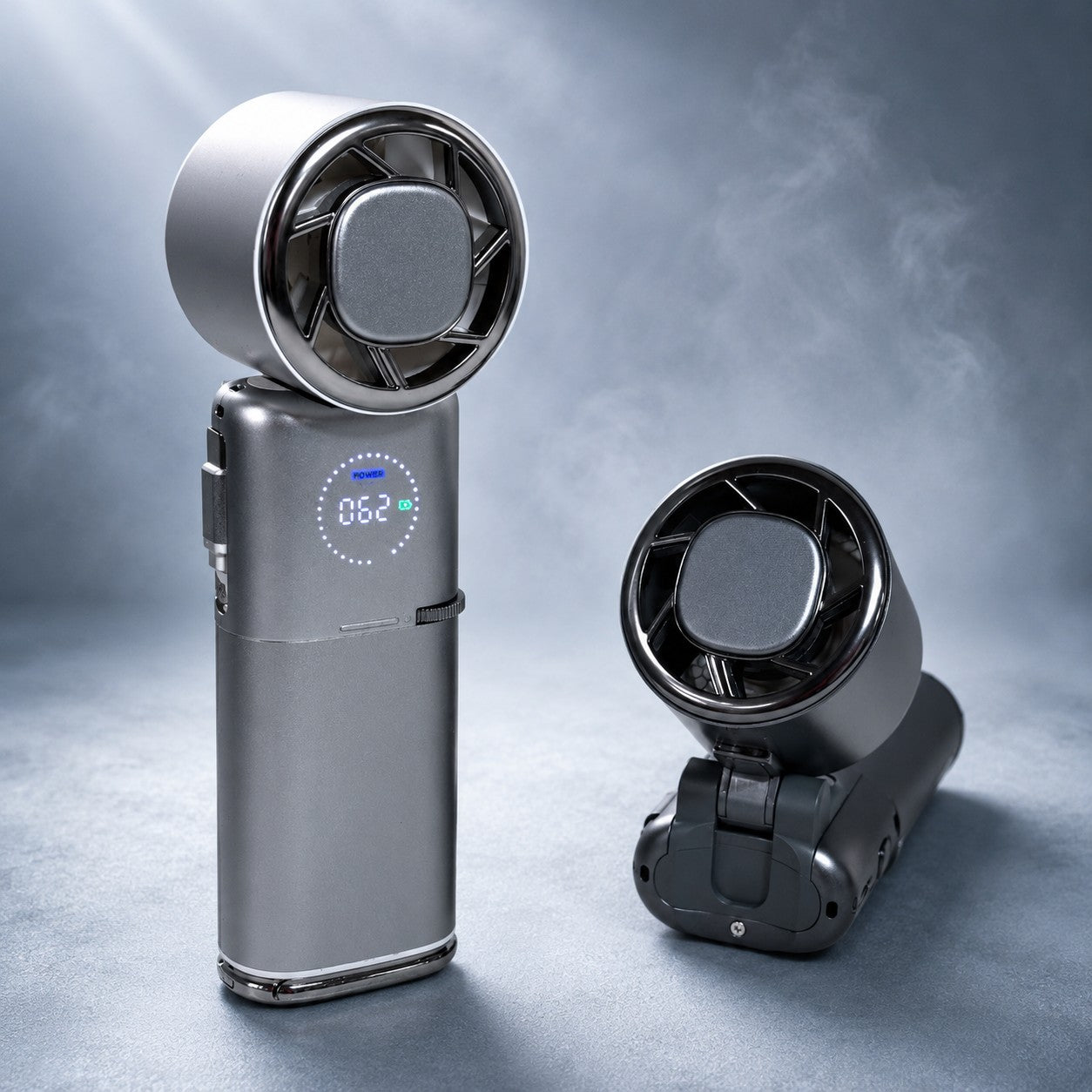
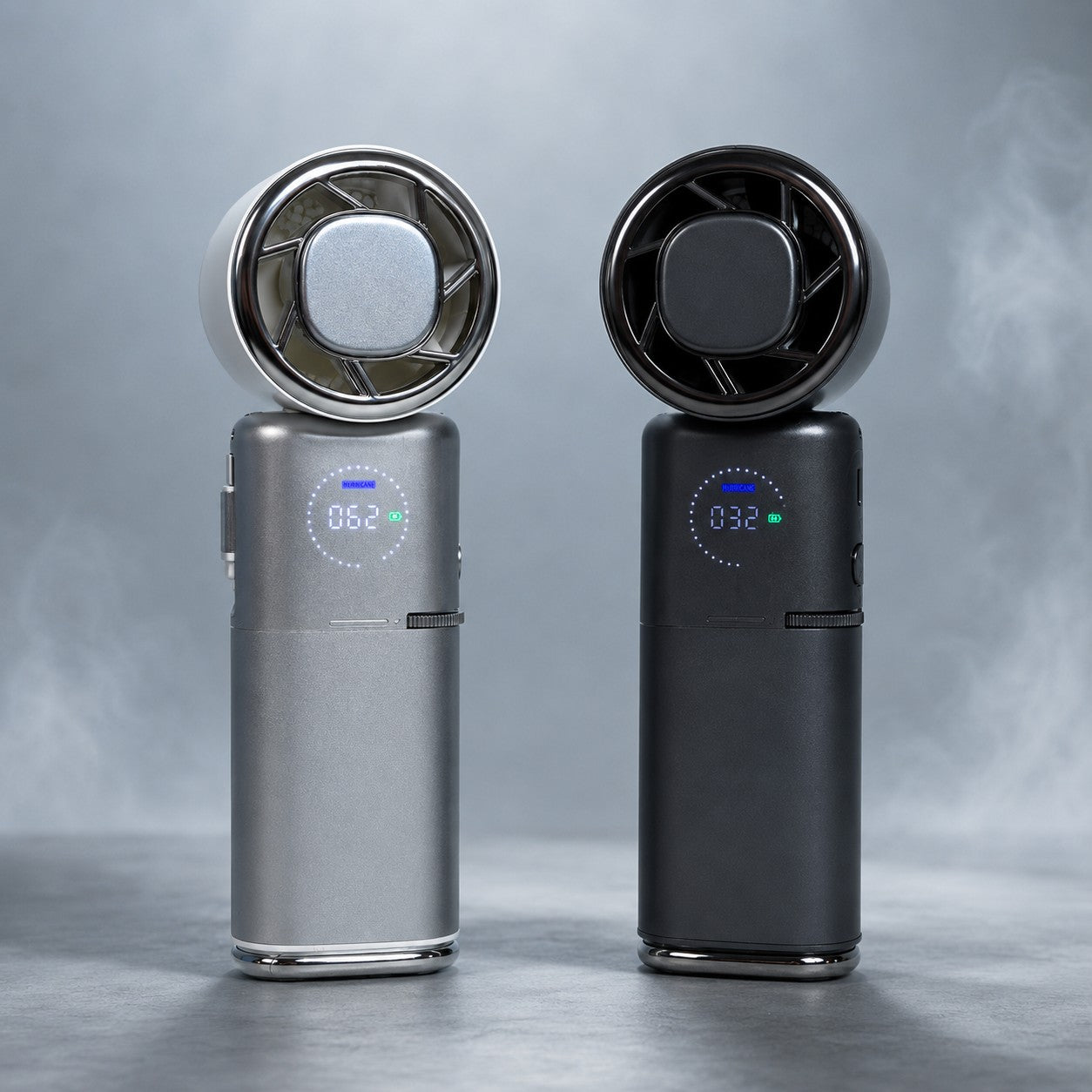
The CapyUltra Portable Turbo Fan with Ice Compress sits at this larger premium end, with a 9000mAh total battery capacity, brushless motor, fine speed adjustment, fast charging, cooling plate and power bank functionality.
It is intentionally more substantial than a pocket fan.
Different fan. Different job.
Waist and Wearable Fans
If you need both hands free, carrying a fan around all day becomes impractical.
That is where wearable fans become much more interesting.
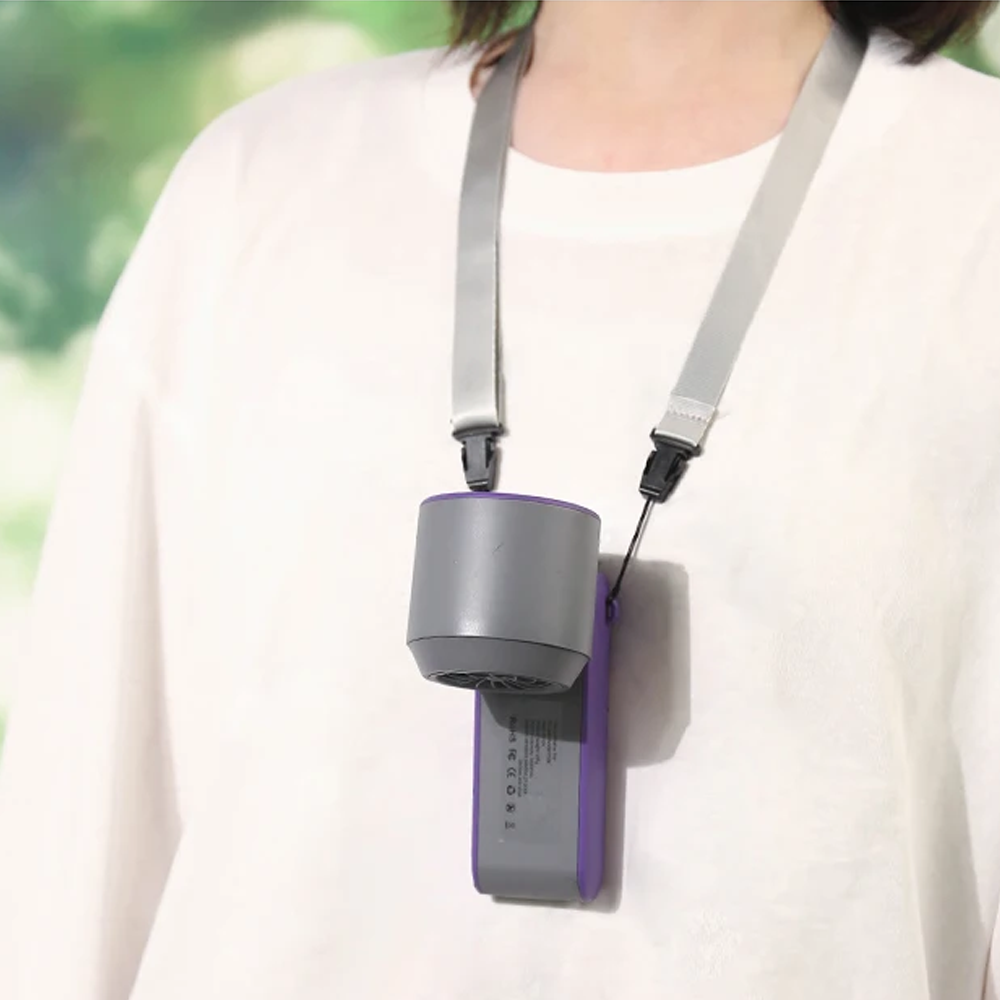
A waist fan can clip to a belt or waistband and direct airflow upwards through or under your shirt. Some designs can also hang from a lanyard or stand independently.
This makes them particularly useful for:
- Trades and construction
- Gardening
- Warehouses
- Outdoor work
- Camping
- Hiking
- Festivals
- Markets
- DIY jobs
- Anyone moving around for long periods
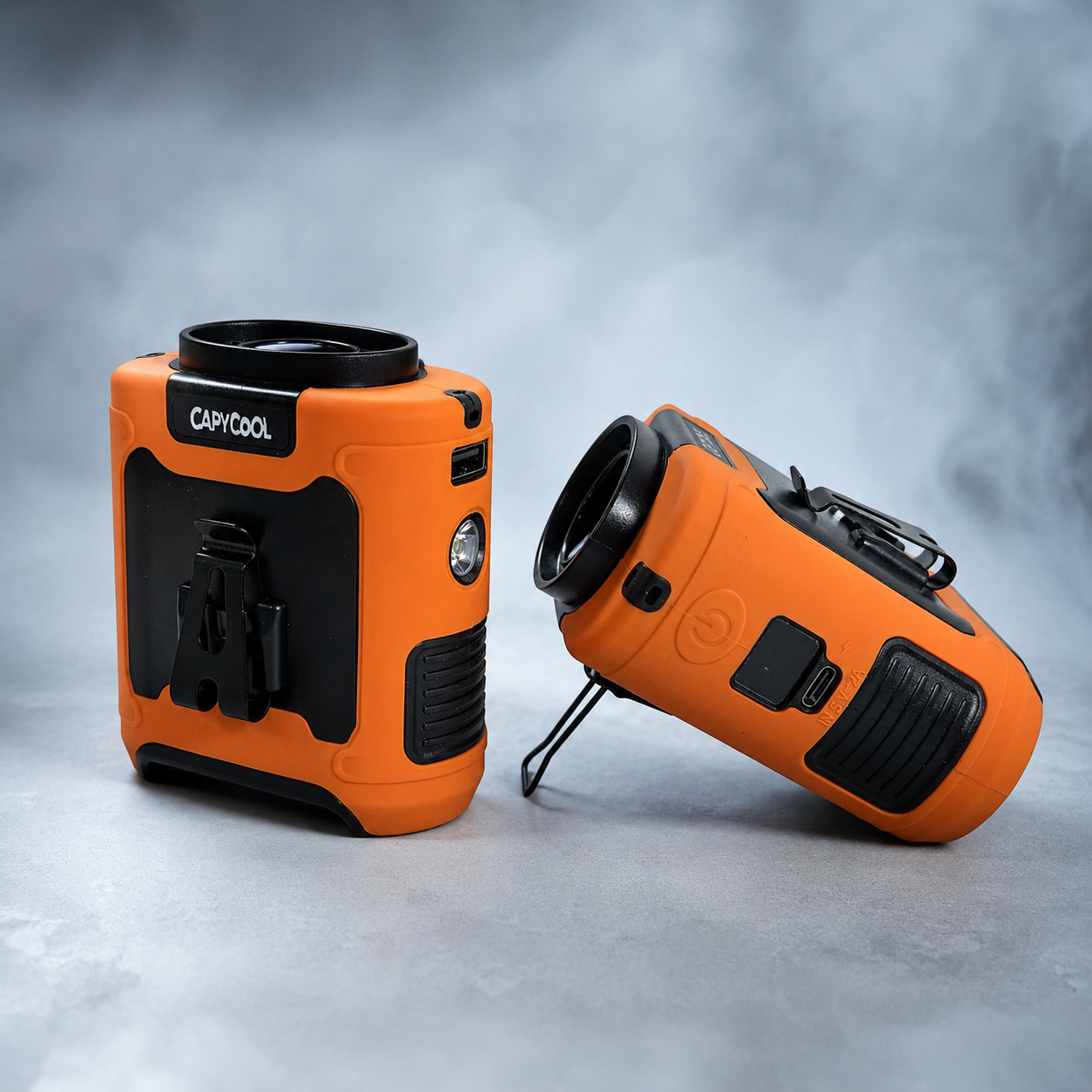
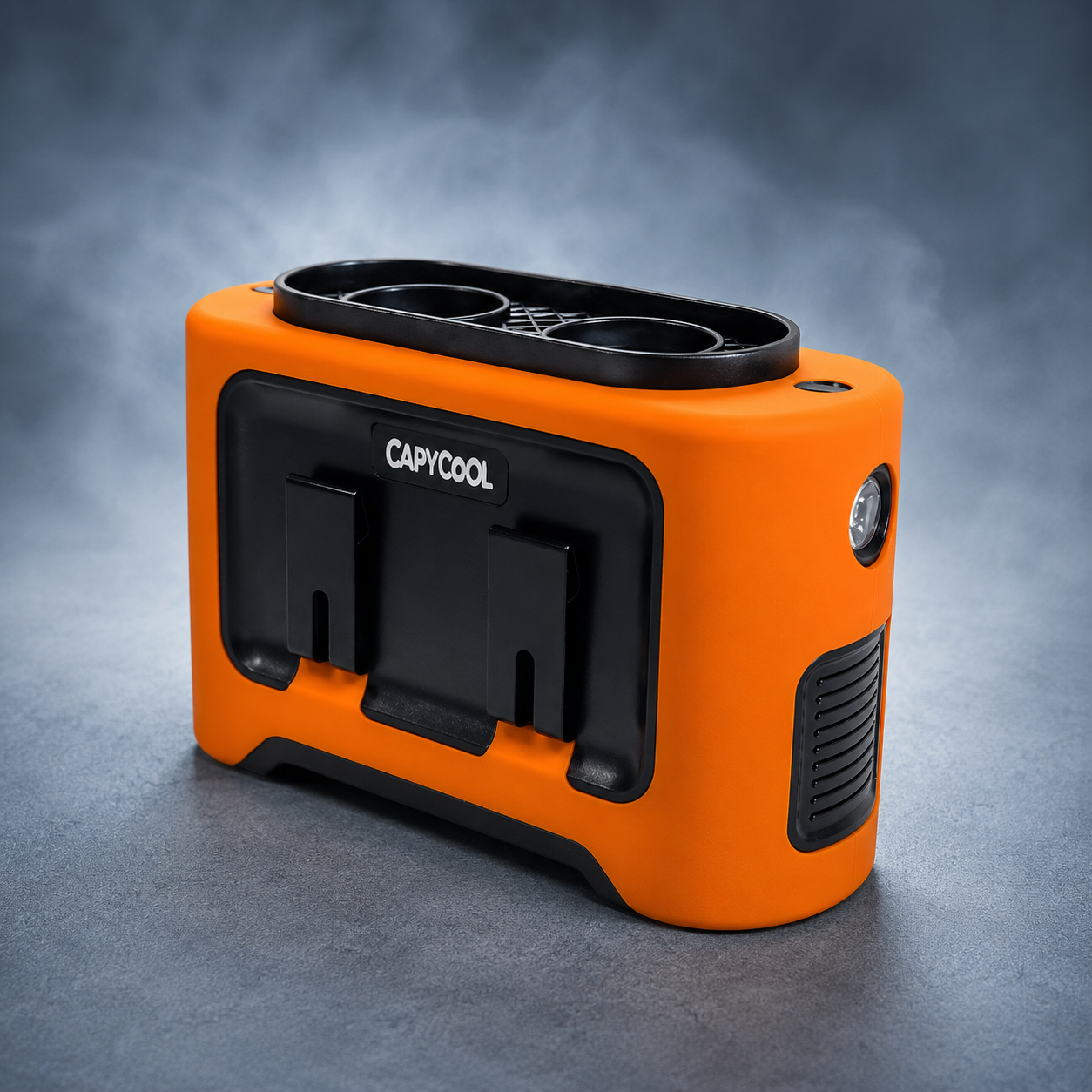
CapyCool's 10,000mAh 3-in-1 Waist Fan is a good example of how far this category has moved beyond a simple belt fan.
It combines wearable cooling with portable desk use, lanyard use, a flashlight and power bank capability.
The larger battery naturally adds more weight than you would find in a tiny pocket fan, but that is the trade-off for much longer usage.
Neck Fans
Neck fans solve another version of the hands-free problem.
Instead of clipping to clothing, they sit around the shoulders or neck and direct air towards your face and upper body.
They can be particularly convenient for walking, commuting, household jobs and environments where clipping something to your waistband is impractical.
The main considerations are weight, comfort, airflow direction and how much motor noise you hear with the fans positioned close to your ears.
Clip-On and Mounted Fans
Sometimes you do not need a completely different fan.
You need a better way of positioning the fan you already own.
A universal holder can turn a compatible handheld fan into:
- A pram fan
- A desk fan
- A camping fan
- A treadmill fan
- A fan attached to a chair
- A tripod-mounted fan
- A fan attached to a railing or suitable bar
The CapyCool Adjustable Stroller & Pram Handheld Fan Holder, for example, uses an adjustable clamp and 360-degree ball joint to hold compatible portable fans in place.
That brings us to one of our favourite principles:
Portability is not just about being able to carry something. It is about being able to use it where you actually need it.
Magnetic Phone Fans
This is a more specialised category, but a clever one.
If your phone is already in your hand for a long commute, video call, gaming session or content binge, attaching a little fan to it can make more sense than carrying two completely separate objects.
The CapyCool MagFan Pro Magnetic Phone Fan attaches magnetically to compatible phones, can form part of a phone stand setup and can also work independently as a small desktop fan.
It has a much smaller battery than one of our larger wearable fans.
That would look unimpressive if you simply compared battery numbers.
But the MagFan is solving a completely different problem.
That is why comparing portable fans only by specifications rarely tells the whole story.
2. How Powerful Should a Portable Fan Be?
This is probably the most common question people ask about portable fans.
It is also where specifications can become a little misleading.
You will often see numbers such as:
- 10,000 RPM
- 16,000 RPM
- 20,000 RPM
- "Turbo motor"
- "Hurricane airflow"
- Air speed measured in metres per second or kilometres per hour
Those numbers can be useful.
But no single one tells you exactly how the fan will feel.
RPM Is Not the Same Thing as Airflow
RPM means revolutions per minute.
It tells you how quickly the motor or fan assembly is rotating.
A higher RPM can help create stronger airflow, but it is only one part of the system.
Actual airflow is also influenced by:
- Blade diameter
- Blade shape
- Number of blades
- Blade pitch
- Motor torque
- Fan housing
- Air inlet size
- Outlet size
- Internal ducting
- Distance from the fan
- Restrictions around the blades
Imagine two cars with engines spinning at the same RPM.
That does not tell you whether they produce the same power, torque or speed.
Fans are similar.
A well-designed fan is a system, not just a motor-speed number.
Why Fan and Duct Design Matter
Modern turbo fans increasingly use enclosed ducts to concentrate airflow.
Instead of simply moving air in every direction, the housing can help direct a narrower stream towards the user.
That is why some very compact fans can feel surprisingly strong at close range.
This also explains why you need to consider where the airflow needs to reach.
A pocket fan held 30cm from your face has a very different job from a larger fan expected to circulate air through a tent or cabin.
More Power Has a Cost
There is no magic here.
Producing more airflow generally requires more electrical power.
That means turning your portable fan up can result in:
- Shorter battery life
- More motor noise
- More air noise
- Additional vibration
- More heat generated by the electronics
This is why maximum speed should not be the only speed you care about.
The best fans give you enough adjustment that you can find a comfortable middle ground.
Use lower airflow at your desk.
Turn it up on a hot train platform.
Drop it back down again when you are sitting somewhere quiet.
What About 100-Speed Portable Fans?
Some newer portable fans, including CapyCool's Foldable Turbo Fan and CapyUltra, offer very fine airflow adjustment.
That does not mean a 100-speed fan is dramatically more powerful simply because it has more selectable levels.
Think of it more like a volume dial.
The advantage is control.
You can dial the fan down until it becomes comfortable for a desk or office, then push it much higher when you move outdoors.
3. Portable Fan Battery Life: What Does mAh Actually Mean?
Battery capacity is one of the easiest portable fan specifications to compare.
It is also one of the easiest to misunderstand.
Most rechargeable portable fans advertise battery capacity in mAh, or milliamp hours.
Broadly speaking, a larger mAh figure means the battery can store more electrical charge.
But there is an important catch.
You cannot determine real-world runtime from mAh alone.
Bigger Battery Versus Lighter Fan
Consider a few very different types of CapyCool fan:
| Fan | Battery | Designed Around |
|---|---|---|
| CapyMini | 3000mAh | Ultra-light everyday carry |
| Foldable Turbo | 3600mAh | Compact multi-use handheld cooling |
| CapyUltra | 9000mAh | Long-use premium handheld cooling |
| 3-in-1 Waist Fan | 10,000mAh | Long-duration hands-free cooling |
Those battery sizes make sense because the products have different jobs.
The CapyMini prioritises being around 90g and genuinely pocket-friendly.
The 3-in-1 Waist Fan is substantially heavier, but it also carries a much larger 10,000mAh battery.
If we put a 10,000mAh battery into every tiny pocket fan, it would stop being a tiny pocket fan.
Why Battery Runtime Changes With Fan Speed
A motor requires energy.
The harder you run it, the more energy it consumes.
This is why a manufacturer might advertise:
"Up to 40 hours battery life."
The words up to matter.
Maximum runtime normally reflects lower-power operation, not maximum airflow.
The same applies when a fan has additional electrical functions.
For example, the Foldable Turbo Fan with Ice Cooling Technology has both fan airflow and an electronically cooled plate.
Run the fan gently and the battery lasts longer.
Run the fan hard while simultaneously powering the cooling plate and it will naturally consume more electricity.
mAh Versus Wh
You may also see batteries described in Wh, or watt-hours.
Watt-hours can be particularly useful because they account for battery voltage as well as capacity.
The basic calculation is:
Watt-hours = battery voltage × amp-hours
For example, a 9000mAh battery is 9Ah.
At 3.7V:
9Ah × 3.7V = 33.3Wh
Watt-hours are also relevant when travelling with lithium batteries because airline policies are commonly expressed in Wh rather than mAh.
Do Not Judge Battery Quality Only by Capacity
There is another issue that rarely appears on the front of the box.
Two batteries advertising the same nominal capacity can still differ in:
- Cell quality
- Internal resistance
- Cycle life
- Manufacturing consistency
- Thermal behaviour
- Charging electronics
- Protection circuitry
That is one of the reasons we keep coming back to the same point:
Portable fan quality is about much more than the number printed on the outside.
4. How Much Does Fan Noise Matter?
Want maximum airflow from a compact fan?
Physics would like a word.
Moving air creates noise.
Motors create noise.
Blades interacting with air create noise.
The faster a small fan operates, the more noticeable that sound will generally become.
So when a portable fan is marketed as both extremely powerful and completely silent, it is worth applying a little healthy scepticism.
Think About Where You Will Use It
Noise matters much more in some environments than others.
Office or bedroom: You may want low-speed operation that fades into the background.
Public transport: There is already significant ambient noise, so you may prefer more airflow.
Outdoor events: Fan noise is usually far less important than cooling power.
Worksites: Ambient noise can make fan sound almost irrelevant compared with airflow and battery life.
This is another reason adjustable speeds matter.
A better way to think about fan noise is not:
"Is this fan silent?"
Instead ask:
"Can I find a useful airflow level at a noise level that suits where I am?"
5. Weight Might Be the Most Underrated Portable Fan Specification
We obsess over motor speeds and battery capacities.
Then we buy the fan and discover it is annoying to carry.
A portable fan only works if it is portable for you.
That makes weight more important than many people realise.
The Best Portable Fan Is the One You Actually Bring
A 90g fan can live in your handbag.
A heavier fan may spend most of its time in a backpack.
A waist fan can weigh more because your belt carries it rather than your hand.
A campsite fan can weigh more again because you are not walking around holding it all day.
Those are completely different versions of portability.
The CapyMini is a good example of designing around everyday carry at around 90g.
The CapyUltra deliberately goes the other way. It carries a larger battery, brushless motor, power-bank hardware, cooling hardware and a more substantial body.
The waist fan sits somewhere else again, with its size and battery designed around being worn rather than held continuously.
There is no correct number.
Ask yourself:
Where will this fan live when I am not actively using it?
- Your pocket?
- Handbag?
- Work belt?
- Desk?
- Car?
- Backpack?
- Camping kit?
That question often tells you more than a specification sheet.
6. Hands-Free Cooling Can Matter More Than Maximum Power
Here is another buying question that gets overlooked:
Do you actually want to hold your portable fan?
Holding a fan for five minutes is easy.
Holding one throughout a work shift, long walk, festival or day at a theme park is much less appealing.
That is why hands-free cooling has become such a major part of the portable fan category.
Waist-Mounted
Clips to clothing and directs airflow upwards.
Good for work and physical activity.
Lanyard-Mounted
The fan hangs in front of the body and directs air towards the face or upper body.
Many modern handheld fans now include this function.
Neck-Mounted
The entire cooling system rests on the neck or shoulders.
Useful where you need full use of both hands.
Desk-Mounted
The handle converts into a stand.
Very useful for office workers because the same fan can travel with you and then sit independently.
Clamp-Mounted
A universal clamp can turn a compatible portable fan into semi-permanent cooling wherever you can safely attach it.
That is why an accessory such as our Adjustable Stroller & Pram Fan Holder can completely change how you use a normal handheld fan.
It can attach compatible fans to prams, desks, suitable camping gear, treadmills and more, with an adjustable joint for aiming airflow.
A good fan does not just move air. A good setup puts that air where you want it.
7. Flexibility: Can One Portable Fan Replace Several Gadgets?
Portable cooling products are increasingly becoming multi-purpose.
Whether that is valuable depends on whether you will actually use the extra functions.
Useful additions can include:
- Desk stands
- Lanyards
- Waist clips
- Magnetic mounts
- Torches
- Power banks
- Battery displays
- Cooling plates
- Foldable heads
- Interchangeable mounts
The goal should not be adding features simply to make the list on the box longer.
The question is whether those features remove another inconvenience.
The CapyUltra, for example, combines handheld fan use, desk use, cold-contact cooling and power-bank functionality in one device.
The Foldable Turbo Fan can move between handheld, desktop and lanyard use.
The 3-in-1 Waist Fan combines wearable cooling, portable fan use, a flashlight and power-bank functionality.
The question to ask is simple:
Will this flexibility let me take one device instead of several?
If yes, those features have real value.
If not, you might prefer something simpler and lighter.
8. What Is Actually Inside a Portable Fan?
Now we get to the part we find most interesting.
Two portable fans can look almost identical from the outside.
Same colour.
Similar dimensions.
Similar battery claim.
Maybe even a similar-looking display.
Then you open them up.
That is where some of the biggest differences can appear.
At the lowest end of the electronics market, products may be engineered heavily around achieving an extremely low manufacturing cost.
That is not automatically bad.
Sometimes all you need is a basic promotional fan for occasional use.
But reducing manufacturing cost can affect decisions around the motor, battery cells, bearings, wiring, circuit protection, housing materials and quality control.
Those choices are mostly invisible when you are scrolling through product photos.
The Motor: The Engine Inside Your Fan
The motor is responsible for spinning the fan.
Portable fans can use different motor designs, with brushed and brushless DC motors among the common categories used across small electronic products.
Brushed Motors
Traditional brushed DC motors use physical brushes and a commutator to switch electrical current as the motor rotates.
They can be simple and relatively inexpensive.
The downside is that the brushes physically contact moving components, introducing a mechanical wear point.
Brushless Motors
Brushless DC motors replace that mechanical switching with electronic control.
The absence of brushes removes a major wear component and can offer advantages in efficiency, noise and operating life.
That is why brushless motors are increasingly common in appliances, computer cooling systems, power tools and higher-spec portable fans.
But there is an important caveat:
"Brushless" alone does not automatically mean "high quality".
You can still make a very inexpensive brushless motor.
Motor quality can also depend on:
- Copper windings
- Winding quality
- Bearing type
- Bearing quality
- Magnet quality
- Tolerances
- Balancing
- Electronic control
- Heat management
- Assembly quality
For example, CapyCool's 3-in-1 Waist Fan uses a brushless motor with copper wiring and upgraded internal components designed around longer-duration operation.
Those are the kinds of details hidden behind the word "motor".
Why Bearings Matter
A motor rotates thousands of times every minute.
Anything supporting that rotating assembly matters.
Higher-quality bearings can help a motor rotate smoothly, reduce unwanted movement and minimise mechanical wear.
Poor tolerances or lower-quality components may contribute to:
- Vibration
- Rattling
- Inconsistent sound
- Additional friction
- Premature wear
You may never see the bearing when buying a fan.
You will probably notice the result if it is not doing its job.
Copper Wiring and Motor Windings
Copper is an excellent electrical conductor, which is why it is widely used in motor windings.
The amount of copper, winding design and manufacturing consistency can all influence the characteristics of the motor.
Again, none of this makes particularly exciting packaging copy.
But if you are asking why two fans that look similar can behave differently after repeated use, these are the kinds of details worth thinking about.
9. The Lithium Battery: Capacity Is Only Half the Story
Lithium-ion batteries are one of the technologies that made modern portable fans possible.
They pack substantial rechargeable energy into a relatively small space.
But just like motors, lithium battery cells can vary in quality.
What Should You Care About?
A portable fan battery needs to deliver several things well.
Capacity: Does it actually store the amount of energy claimed?
Power delivery: Can it supply the motor reliably when demand increases?
Longevity: How well does it maintain its performance after repeated charging and discharging?
Consistency: How consistent are the cells and overall battery system?
The battery may be hidden inside a plastic enclosure, but it is one of the most important components in any rechargeable fan.
Bigger Does Not Always Mean Better
We touched on this earlier, but it is worth repeating.
The goal is not to buy the biggest battery available.
The goal is to buy enough battery for your use.
If you need a fan for the train trip home, a compact 3000mAh model might make perfect sense.
If you need airflow through a long outdoor shift, a much larger wearable fan may be more appropriate.
Every additional battery cell adds size and weight. Battery capacity is always a trade-off.
10. The PCB: The Part Almost Nobody Thinks About
If the motor is the engine and the battery is the fuel tank, the PCB is part of the control centre.
PCB stands for printed circuit board.
It is the board containing electronic components that help manage how the fan operates.
Depending on the design, circuitry may handle functions such as:
- Speed control
- Battery monitoring
- Charging
- Displays
- Button inputs
- Motor control
- Power-bank output
- Temperature monitoring
- Over-current protection
- Overcharge protection
- Over-discharge protection
- Short-circuit protection
Not every fan contains every type of protection or monitoring system, so be cautious with broad claims.
But these are precisely the kinds of features that can separate a very basic electronic design from a more developed one.
You cannot see the PCB from the outside.
But when comparing rechargeable electronics, it is worth remembering:
The product is not only the plastic shell you can see.
11. Housing, Hinges, Clips and the Boring Stuff That Actually Matters
Portable products get knocked around.
They live in bags.
They get dropped onto desks.
They bounce around toolboxes and gloveboxes.
They are clipped onto belts.
They are folded and unfolded.
They get taken camping.
That means construction quality matters.
Materials you may find across portable fan designs include:
- ABS
- Polycarbonate
- Silicone
- Metal clips
- Reinforced hinges
- Padded mounts
The CapyUltra, for example, uses a more substantial construction because it houses a much larger battery and additional electronics than a tiny pocket fan.
The 3-in-1 Waist Fan is similarly designed around being clipped, carried and used in more demanding environments.
None of those structural features make the airflow stronger on day one.
They matter because portable electronics have to survive being portable.
12. Cheap Portable Fan vs Better-Built Portable Fan
It is tempting to simplify this into:
Cheap fan bad. Expensive fan good.
That would be convenient.
It would also be wrong.
Price alone does not prove quality.
A cheap fan may be perfectly suitable if you only need occasional light airflow.
An expensive product can also be overpriced.
Instead, look at what you are actually getting.
| What to Look At | Basic / Promotional Fan | Better-Specified Portable Fan |
|---|---|---|
| Motor | Often selected heavily around unit cost | May use higher-spec brushless motor and components |
| Battery | Smaller or minimally documented | Clearly specified capacity and realistic runtime |
| Speed Control | Basic low / medium / high | Wider or finer airflow adjustment |
| Electronics | Simpler circuitry | More developed motor, charging and protection management |
| Construction | Lightweight basic shell | Materials selected for repeated portable use |
| Charging | Basic charging | USB-C or faster charging on some newer designs |
| Display | Often none | Battery and speed information on some models |
| Flexibility | Fan only | Stand, mount, lanyard, power bank or other useful functions |
| Support | Highly variable | Warranty and local support can add confidence |
If you only need a fan for two afternoons at a party, some of these differences may not matter much.
If you are clipping a fan onto your belt five days a week through summer, they probably matter a lot more.
Buy for the job, not the marketing.
13. Portable Fans With Ice Compress and Cooling Plates: How Do They Work?
This is one of the most interesting developments in portable fans.
You may have seen terms such as:
- Ice compress fan
- Cooling plate fan
- Semiconductor cooling fan
- Thermoelectric fan
- Peltier fan
- Cold plate fan
Despite the name, there is usually no actual ice involved.
There is also no tiny refrigerator hiding inside your handheld fan.
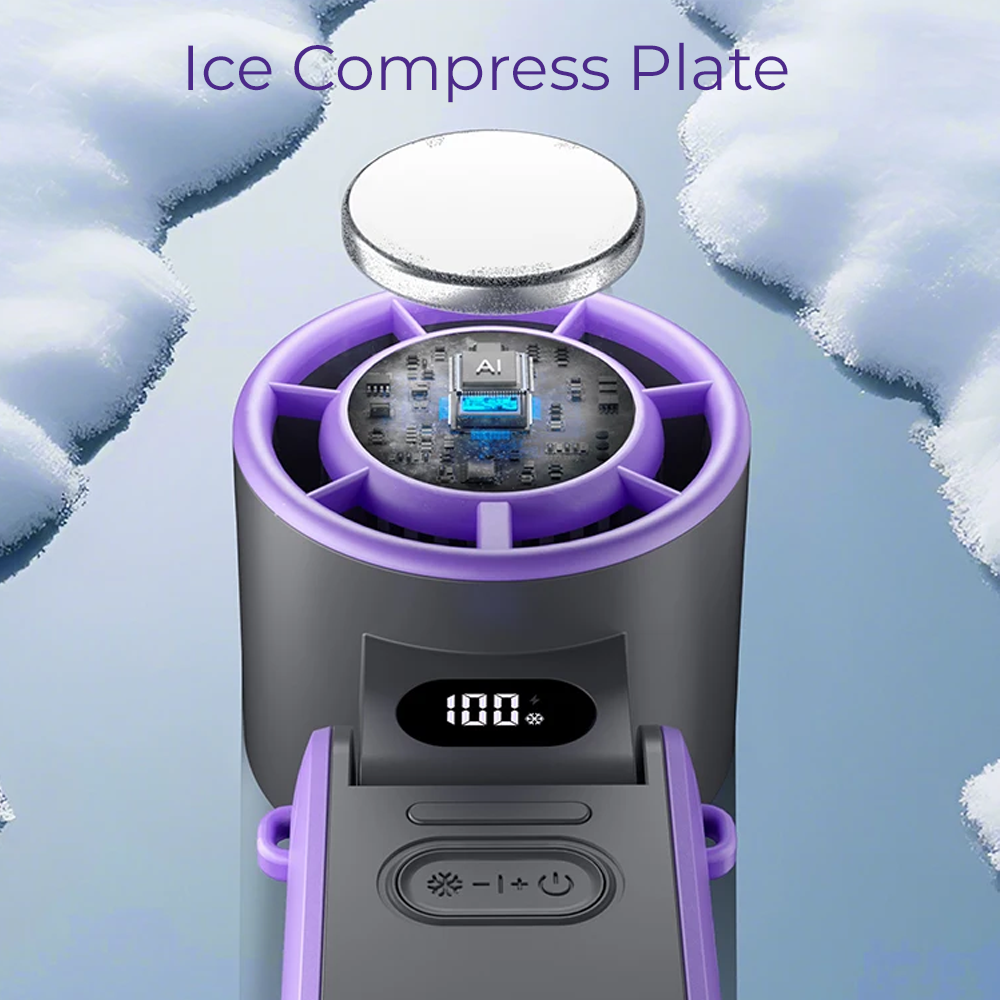
Instead, many of these products use a thermoelectric cooling system.
What Is Thermoelectric Cooling?
A thermoelectric cooler is a solid-state device that transfers heat from one side of a module to another when electrical current is applied.
This is commonly associated with the Peltier effect.
One side becomes cold.
The other side becomes warm and needs to dissipate the transferred heat.
Unlike a conventional refrigerator or air conditioner, a thermoelectric cooling module does not need a compressor or circulating refrigerant to create that small cold surface.
In a portable fan, the cold side can be connected to a metal plate.
That is the part you touch.
What Does the "Ice Plate" Actually Do?
Press it against exposed skin such as your:
- Neck
- Wrist
- Forehead
- Cheek
Instead of relying only on moving air, you also get direct cold contact against your skin.
The sensation is very different from fan airflow.
It is more like pressing a cold metal surface against yourself on a hot day.
That is why we describe the technology as an ice compress.
The CapyMini Turbo Fan, Foldable Turbo Fan and CapyUltra all combine normal fan airflow with this type of direct-contact cooling option.
Does an Ice Compress Fan Cool the Air?
Generally, no.
This distinction matters.
The cooling plate is designed to cool the small area of skin that comes into contact with it.
It does not turn the surrounding air cold.
It does not lower the temperature of your bedroom.
It is not a miniature air conditioner.
Think of the two technologies separately:
Fan: Moves air across your skin.
Cooling plate: Provides direct cold contact against your skin.
Together, they give you two different ways to respond when you are feeling hot.
Why Doesn't the Cooling Plate Chill All the Airflow?
Thermoelectric systems move heat rather than making heat disappear.
While one side becomes cold, the other side needs to reject the transferred heat.
Cooling a small metal contact surface requires far less energy and hardware than refrigerating a continuous stream of air.
Trying to make a genuinely pocket-sized air conditioner is therefore an entirely different engineering problem.
That is why a portable cooling plate should be judged by how it feels in direct contact with your skin, not whether it can cool a room.
Does Ice Compress Mode Use More Battery?
Yes.
Operating an electronic cooling plate requires electricity.
If you run the cooling plate and fan at high speed simultaneously, battery consumption will generally increase.
That is another reason independent controls can be useful.
You might use the fan continuously and activate the cooling plate only when you want a quick cold press.
14. Do Portable Fans Actually Cool You?
Yes, but it is important to understand how.
A normal fan does not refrigerate the air.
It moves it.
Your body manages heat partly through sweating. When sweat evaporates from your skin, heat is transferred away.
Air movement can support evaporation and convective heat exchange, which is why a breeze can feel dramatically more comfortable than still air at exactly the same temperature.
That also explains why a portable fan can feel particularly useful when you are:
- Walking
- Sitting somewhere stagnant
- Commuting
- Standing in a queue
- Working outside
- Wearing warm clothing
- In a stuffy room
But Fans Have Limits
A portable fan is a personal comfort tool.
It is not protection against every level of extreme heat.
During very hot conditions, cooling strategies can also include:
- Shade
- Hydration
- Rest
- Cool water
- Appropriate clothing
- Air-conditioned environments where available
If someone shows signs of heat illness, a portable fan is not a substitute for appropriate first aid or medical attention.
Stay cool, but stay sensible too.
15. Which Portable Fan Should You Choose?
If you have made it this far and are thinking:
"Great. So which one do I actually buy?"
Here is the simple version.
Best for Pockets, Handbags and Everyday Carry: CapyMini
Choose the CapyMini Turbo Fan with Ice Compress if your priority is small size and low weight.
At around 90g with a 3000mAh battery, folding stand, lanyard mode and cooling plate, it is designed to disappear into your everyday carry until you need it.
Good for: commuting, travel, festivals, theme parks, handbags, school pickup and quick personal cooling.
Best All-Round Compact Handheld: Foldable Turbo Fan
Choose the Foldable Turbo Fan with Ice Cooling Technology if you want a versatile everyday handheld fan without moving into a larger premium model.
It combines a 3600mAh battery, fine airflow adjustment, folding body, desktop use, lanyard use and a cold-contact cooling plate.
Good for: work, commuting, home, travel and anyone wanting one flexible handheld fan.
Best for Long-Use Premium Handheld Cooling: CapyUltra
Choose the CapyUltra Portable Turbo Fan if you prioritise battery capacity, stronger construction and additional functionality over being pocket-sized.
It combines a 9000mAh battery, brushless motor, fine speed control, fast charging, power-bank functionality and ice compress cooling.
Good for: long days, travel bags, desks and people who want one feature-packed portable cooling device.
Best for Work and Long Hands-Free Use: 3-in-1 Waist Fan
Choose the 10,000mAh 3-in-1 Waist Fan if you need to keep your hands free and want much more battery capacity than a tiny handheld fan.
The fan can work from your waist, desk or lanyard while also providing flashlight and power-bank functionality.
Good for: tradies, outdoor workers, gardening, camping, festivals and long days away from power.
Best for Phone Users: MagFan Pro
Choose the MagFan Pro Magnetic Phone Fan if you want compact cooling built around something already in your hand.
It magnetically integrates with compatible phones, works as part of a phone stand setup and can also operate independently as a small desk fan.
Good for: desks, streaming, video calls, gaming and commuting.
Best Way to Turn a Handheld Fan Into a Mounted Fan: Universal Fan Holder
Already have a compatible fan?
The Adjustable Stroller & Pram Handheld Fan Holder can turn it into a clamp-mounted fan for prams, desks, suitable camping setups, treadmills and more.
Sometimes the best new fan is simply a better way to use the one you already have.
Portable Fan FAQ
What should I look for when buying a portable fan?
Start with how you plan to use it, then compare airflow, battery life, weight, noise and mounting options. After that, look at less obvious quality factors such as motor type, lithium battery specification, charging circuitry, PCB protection and construction materials. The best portable fan is not necessarily the model with the largest battery or highest RPM. It is the fan that balances these factors for your particular use.
What is the best type of portable fan?
There is no single best type. Handheld fans offer direct control, waist and neck fans are useful when you need both hands free, mounted fans work well for fixed positions such as desks and prams, while larger portable fans can prioritise battery life and broader airflow. Choose the format before comparing specifications.
What makes a portable fan powerful?
Fan power depends on the complete airflow system. Motor speed is one factor, but blade geometry, blade diameter, motor torque, housing design, air inlets, duct shape and outlets also influence how much air reaches you. This is why RPM alone should not be used to judge two fans.
Is higher RPM always better on a portable fan?
No. Higher RPM means the motor rotates faster, but it does not automatically mean better airflow. It can also increase power consumption and noise. A well-designed fan running at a lower RPM may still deliver useful airflow because of its blades, motor torque and ducting.
Are 100-speed portable fans actually better?
Having 100 selectable levels does not make a fan inherently more powerful. The advantage is finer control. Instead of choosing only low, medium or high, you can adjust airflow more precisely to balance comfort, noise and battery consumption.
How many mAh should a good portable fan have?
It depends on how long you need it to operate and how portable you want it to be. A pocket fan may use around 3000mAh to keep size and weight down, while larger handheld or wearable fans may use 9000mAh, 10,000mAh or more. Bigger batteries generally increase runtime but also add weight.
How long should a rechargeable portable fan last?
Runtime varies dramatically depending on battery capacity, motor power and airflow setting. Compact handheld models may provide several hours, while larger waist or camping fans can run substantially longer. Always check whether an advertised runtime reflects low-speed operation or maximum fan output.
Why does my portable fan battery drain faster on high speed?
The motor consumes more electrical power when producing stronger airflow. Additional electrical functions such as cooling plates, lights and power-bank output also consume battery energy. Maximum airflow plus other active features will normally result in the shortest runtime.
What is the difference between mAh and Wh?
mAh measures electrical charge capacity, while Wh measures stored energy while accounting for battery voltage. To calculate watt-hours, multiply battery voltage by capacity in amp-hours. For example, a 9000mAh battery is 9Ah, so at 3.7V it contains approximately 33.3Wh.
Can portable fans be used while charging?
Some can and some cannot. Look for a model specifically designed to support operation while charging and follow the manufacturer's instructions. Charging behaviour can differ between products.
Are portable fans with power banks worth it?
They can be very useful when the fan already contains a large battery. A power-bank function allows some of that stored energy to provide an emergency phone top-up. Keep in mind that charging another device leaves less energy available for running the fan.
Can I take a rechargeable portable fan on a plane?
Many rechargeable portable fans can travel in cabin baggage when their lithium battery is within the relevant airline and aviation limits. Rules vary between airlines and countries, so always check the watt-hour rating of the battery and your airline's current policy before travelling.
How loud should a portable fan be?
There is no perfect number because acceptable noise depends on how you use the fan. A bedroom or office fan should provide comfortable lower-speed operation, while maximum airflow outdoors can reasonably be more audible. Adjustable speed is often more useful than a claim that a powerful fan is "silent".
Do more fan blades mean more airflow?
Not necessarily. Blade count is only one part of fan design. Blade size, angle, motor power, rotational speed and housing design all affect airflow. More blades can change airflow characteristics and sound, but blade count alone does not prove that one fan is stronger.
Do portable fans actually make you cooler?
Portable fans can make you feel cooler by increasing air movement across your skin, supporting evaporation of sweat and heat exchange. They generally do not reduce room temperature like an air conditioner.
Does a portable fan cool a room?
A normal portable fan moves air rather than refrigerating it, so it does not actively lower room temperature like an air conditioner. Its main purpose is personal airflow and comfort.
Do portable fans work in humid weather?
Yes, although high humidity can reduce the effectiveness of evaporative cooling because sweat evaporates less readily. Moving air can still improve comfort, particularly in stagnant conditions, but portable fans have limits during extreme heat and humidity.
Why are some portable fans much more expensive than others?
Part of the difference may come from battery capacity and extra features, but internal components can also vary. Motors, bearings, lithium cells, PCB protection, wiring, charging electronics, housing materials, hinges, clips and quality-control requirements can all contribute to manufacturing cost. Price alone does not prove quality, but two similar-looking fans may contain very different hardware.
What is the difference between brushed and brushless fan motors?
A brushed DC motor uses physical brushes and a commutator to switch electrical current. A brushless motor switches electronically, removing those physical brush contacts. Brushless designs can offer advantages in efficiency, noise and longevity because there are fewer mechanically wearing components inside the motor.
Does brushless automatically mean high quality?
No. Brushless describes the motor architecture, not the entire quality level. Bearings, windings, magnets, electronic control, assembly quality and motor design still matter.
Why does the PCB matter in a portable fan?
The printed circuit board helps control electrical functions such as the motor, charging, speed adjustment and battery management. Depending on the fan, circuitry can also help monitor or protect against conditions such as excessive current, overcharging, overheating or excessive discharge.
Does lithium battery quality matter in a portable fan?
Yes. Two cells with the same advertised capacity can differ in manufacturing consistency, power delivery, cycle life and thermal characteristics. Battery quality and charging management are important in rechargeable products expected to be used repeatedly.
What is an ice compress portable fan?
An ice compress fan combines normal fan airflow with an electronically cooled surface that can be pressed directly against your skin. Despite the name, it generally contains no actual ice. "Ice compress" describes the cold-contact sensation.
How does a semiconductor cooling plate work?
Many electronic cooling plates use thermoelectric technology. Electricity causes heat to be transferred from one side of the cooling module to the other, allowing one side to become cold. That cold side is connected to the metal plate you touch.
Does an ice compress plate actually contain ice?
No. In products such as the CapyCool Turbo range, the plate is electronically cooled. You do not need to freeze it or add water.
Does an ice plate make the fan's air colder?
Not generally. On CapyCool's ice-compress fans, the plate is designed for direct contact with your skin. It does not refrigerate the fan's airflow or cool an entire room.
Is a cooling-plate fan the same as a portable air conditioner?
No. An air conditioner actively removes heat from an indoor space using a refrigeration system. A handheld thermoelectric fan primarily moves air while providing a small cold surface for direct-contact cooling. The two devices operate on very different scales.
Does an ice compress use more battery?
Yes. Electronic cooling requires power, so using a thermoelectric plate alongside higher fan speeds will generally reduce battery runtime compared with operating the fan alone.
What portable fan is best for travelling?
For travelling, prioritise weight, dimensions, battery capacity and charging convenience. A small fan such as the CapyMini is useful when space matters most. A larger model such as CapyUltra suits travellers willing to carry more weight in exchange for a larger battery and additional features.
What portable fan is best for outdoor work?
Hands-free designs and battery life become much more important for outdoor work. Waist fans can be particularly useful because they clip to clothing and keep your hands free. Look for sturdy clips, durable construction and enough battery capacity for the length of time you normally work away from power.
What portable fan is best for commuting?
A small handheld, lanyard or neck fan is usually one of the easiest options for commuting. Consider whether you need it to fit in your pocket or handbag and whether lower airflow settings are comfortable enough for use on trains and buses.
Can I use a portable fan as a desk fan?
Many modern portable fans have foldable handles or integrated stands. Check whether the fan can stand securely and whether its angle can be adjusted enough to direct airflow towards your face or upper body.
Can a handheld fan be turned into a pram fan?
Yes, provided it is held securely in a compatible mount and positioned safely. A holder such as the CapyCool Adjustable Stroller & Pram Fan Holder can turn compatible handheld fans into clamp-mounted fans for prams and other suitable surfaces.
What is the best way to position a portable fan?
Aim airflow directly towards exposed skin or the area where you want airflow rather than simply placing the fan somewhere nearby. At a desk, angle it towards your face or upper body. A waist fan should be positioned so clothing does not block its air inlet or outlet. Small turbo fans generally feel strongest at relatively close range.
So, What Is the Best Portable Fan?
After all of that, we have arrived at the slightly annoying answer:
It depends.
But now you know what it depends on.
If you want something that disappears into your pocket, prioritise weight and dimensions.
If you work outdoors, prioritise hands-free airflow, battery life and durability.
If you sit at a desk, consider noise and stand functionality.
If you travel, think about battery size, charging, weight and how many functions one device can replace.
If you are interested in newer cooling technology, thermoelectric ice plates can add genuinely useful direct-contact cooling, as long as you understand what they do and what they do not do.
And if you are comparing a $20 fan with something more substantial, look deeper than the casing.
- Ask about the motor.
- Look at the battery.
- Consider the PCB and charging electronics.
- Think about the materials, bearings, clips and hinges.
- Look for realistic battery claims.
- Decide whether those differences matter for how you plan to use it.
Because the best portable fan is not the one with the biggest number printed on the box.
It is the one that is powerful enough when you need it, quiet enough when you do not, lasts long enough for your day and is portable enough that you actually have it with you when the heat arrives.
Find the Right Portable Fan for You
From tiny pocket fans and ice-compress turbo fans to long-runtime hands-free cooling, explore the full CapyCool range and find the setup that fits the way you actually use it.











Share:
Strongest El Niño in 1,000 Years? What Australia Could Face
What Australia Can Learn From Europe and America’s Brutal 2026 Heatwaves